Active Task Assistance

Right place, right the first time

The right data, on the asset, at the moment of work. Assistance is dynamic, not a static work instruction.

Errors start when technical data is transferred by hand.

Technical data packages define the ideal, but they are static, and the physical asset changes. Translating 2D diagrams onto physical surfaces by hand invites misplaced boundaries, drifting curves, and inconsistent scale. Physical errors are inevitable, and costly when discovered after the work is done.

SPIDER anchors patterns, boundaries, and placement zones directly on the part, so every technician works from the same aligned reference.

Where manual transfer breaks down

  1. Static technical data that drifts from the as-is asset
  2. Manual transfer from 2D drawings to the surface
  3. Errors found after the work is done
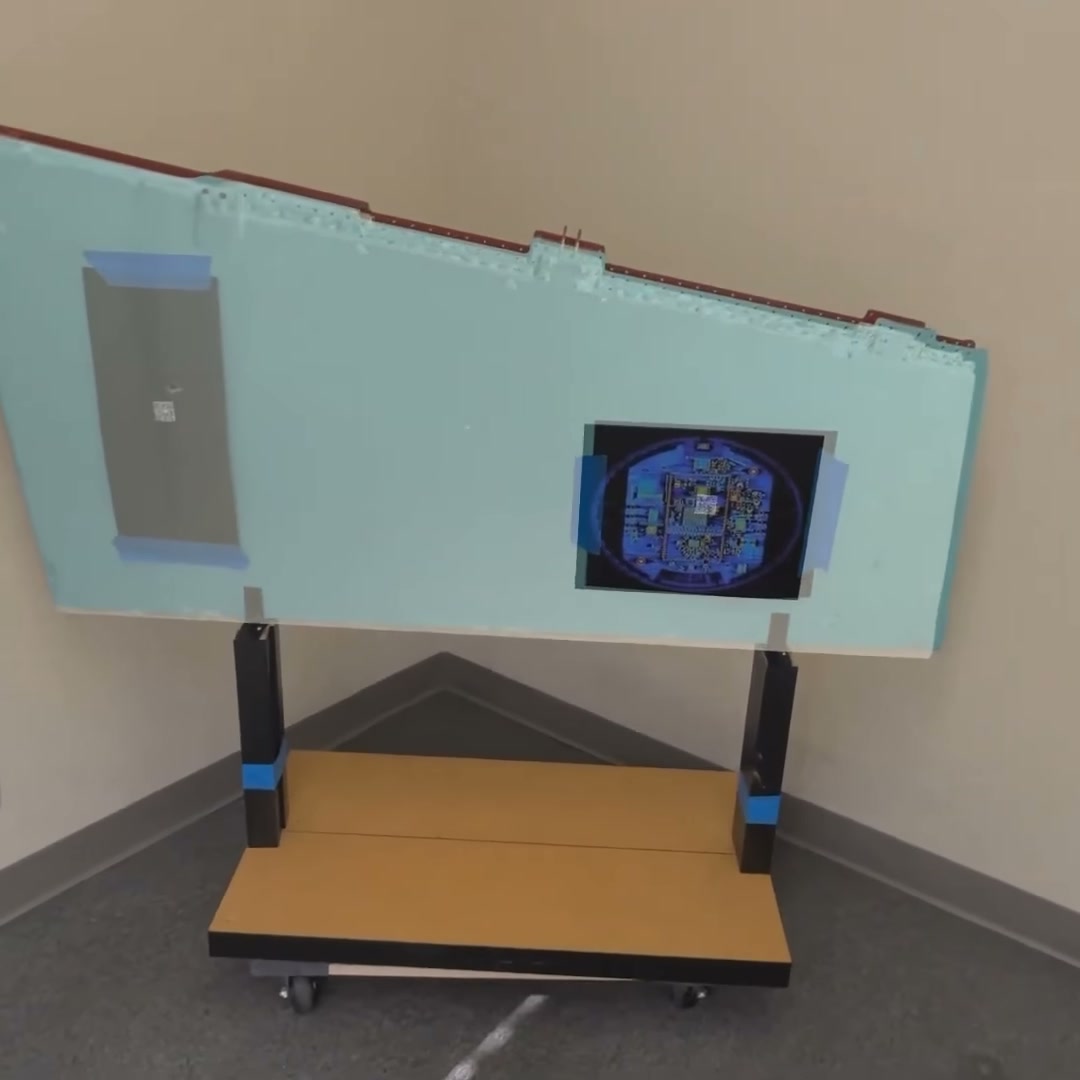
X-ray plate positions shown in place on an aircraft rudder through SPIDER
What SPIDER showsX-ray plate positions for a rudder, placed on the physical part from the digital twin and the task order, with no rulers, chalk, or tape.

What every task needs on the asset

  • The exact target

    The plate, mask zone, or camo pattern is shown on the real part.

  • Errors caught in-process

    Deviations are flagged as they happen, not found at inspection.

  • Legacy 2D data in 3D

    Manuals, diagrams, and plate positions appear on the asset itself.

  • Validation before irreversible steps

    Each step is confirmed before paint, fastener, or capture.

Meet SPIDER Active Task Assistance

Dynamic assistance on the asset’s own digital twin

Assistance is dynamic, not a static work instruction. SPIDER detects the asset, aligns its digital twin to the physical surface, and delivers the right data on the asset, on demand: flagging errors in-process as they happen and confirming each step as it is completed correctly, before anything is committed.

Using commercial off-the-shelf devices like Apple Vision Pro, SPIDER localizes the asset, aligns the digital reference to the physical surface, and anchors the required task in context.

  • Detection and alignment

    The asset is localized and its twin fitted to the surface, with no markers

  • Data in place

    Patterns, placements, and procedures on the asset, on demand

  • Validation

    Each step is confirmed before anything irreversible

How it works

  1. Detect

    The asset is recognized and localized on a commercial off-the-shelf device.

  2. Align

    The digital twin is fitted to the physical surface as it actually sits.

  3. Deliver

    The target appears in place: pattern, placement zone, or procedure step.

  4. Validate

    Deviations are flagged in-process and each step is confirmed before it is committed.

  5. Hand off

    Validated task data goes straight to robotic systems and the digital record.

No manual transfer from 2D drawings at any step.

Built for the shop floor

  • In Context

    Tasks anchored to the exact location on the physical asset, never interpreted from a separate drawing.

  • Consistency

    Uniform results across technicians of every experience level, on every shift.

  • Error Prevention

    Validation before irreversible steps reduces rework, wasted materials, and added inspection time.

  • Robot Handoff

    Validated task data transmits straight to robotic systems, removing manual transfer steps.

One platform, many tasks

The same spatial workflow carries any task that starts as a drawing, a pattern, or a procedure.

  • Camouflage patterns
  • Mask zones
  • X-ray plate placement
  • Fastener installation
  • Assembly sequences
  • Legacy 2D manuals

Ready to put the right data on the asset?

Tell us which task your technicians still transfer by hand, and we will follow up.

Critical Use Cases

CRITICAL USE CASE

Paint Camouflage Guidance

SPIDER overlays camouflage patterns and boundaries onto the physical surface, auto-aligned to the asset. Technicians place and verify each zone before paint is applied, validated in-process rather than caught in rework.

CRITICAL USE CASE

X-Ray Plate Placement

Once the digital twin aligns to the part, AR stencils mark each plate’s target location and confirm placement in real time. Sessions save and recall, with results mapped back onto the asset in context.

CRITICAL USE CASE

Assisted Assembly & Installation

SPIDER auto-aligns the digital twin to the structure, then overlays mark each component’s location and sequence, confirming correct placement as work progresses and leaving a verifiable record.